Generate Response Example
This example shows how to generate bot responses synchronously for human review workflows - ideal for chatter/moderator approval systems.
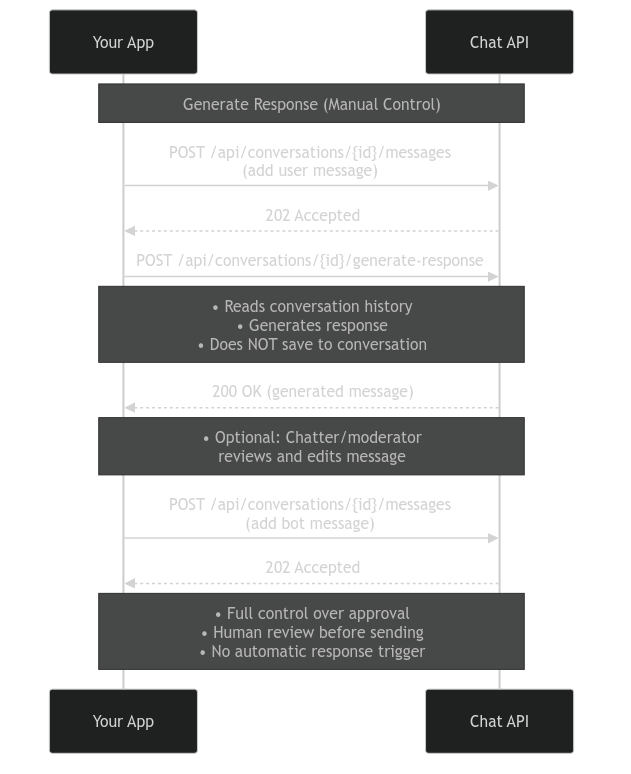
How It Works
Core API Pattern:
- Create a bot and conversation
- Add user messages to the conversation
- Call
/generate-responseto get a bot response candidate - Review/edit the generated response
- Add the approved bot message to the conversation
When to Use Generate Response
Generate Response is ideal for:
- Chatter/moderator workflows where humans review AI responses before sending
- Simple request/response flows
Key Difference: Unlike webhooks/polling, this endpoint does NOT automatically save responses to the conversation. You must manually add both user and bot messages to the conversation history.
Relevant Data Types
Generate Response Request:
{
  // Empty body
}
Generate Response Response:
{
  candidates: [
    {
      messages: [
        {
          text: string,
          from_bot: boolean,
          sent_at: number,
          attached_media: { url: string } | null,
        },
      ],
    },
  ];
}
The response contains an array of messages. The bot can send multiple messages (chunks) for realism - like when real people don't send a wall of text. If you want responses in a single chunk, disable segmentation in your conversation settings.
Step 1: Set Up Imports and Configuration
import requests

API_KEY = "sk_yourapikey"
BASE_URL = "https://api.prioros.com/v3"

headers = {
    "Authorization": f"Bearer {API_KEY}",
    "Content-Type": "application/json"
}
Step 2: Create a Bot
Create a bot with a personality and attributes:
bot_response = requests.post(
    f"{BASE_URL}/api/bots",
    headers=headers,
    json={
        "name": "Anna",
        "freeform": "You're energetic and passionate",
        "attributes": [
            {"name": "bio", "value": "Certified personal trainer specializing in HIIT"},
            {"name": "age", "value": "28"},
            {"name": "location", "value": "Miami, FL"}
        ]
    }
)

bot_id = bot_response.json()['bot']['id']
print(f"✓ Bot created (ID: {bot_id})\n")
Step 3: Create a Conversation
Create a conversation between the bot and a user:
conversation_response = requests.post(
    f"{BASE_URL}/api/conversations",
    headers=headers,
    json={
        "bot_id": bot_id,
        "user_id": "user_example",
        "create_user_if_not_exists": True
    }
)

conversation_id = conversation_response.json()['conversation']['id']
print(f"✓ Conversation created (ID: {conversation_id})\n")
Step 4: Add User Message
Add the user's message to the conversation:
def add_user_message(conversation_id, text):
    """Add a user message to the conversation"""
    requests.post(
        f"{BASE_URL}/api/conversations/{conversation_id}/messages",
        headers=headers,
        json={
            "message": {
                "text": text,
                "from_bot": False
            }
        }
    )
Step 5: Generate Response
Generate a bot response without saving it to the conversation:
def generate_response(conversation_id):
    """Generate bot response without saving it"""
    response = requests.post(
        f"{BASE_URL}/api/conversations/{conversation_id}/generate-response",
        headers=headers,
        json={}
    )
    # Returns array of messages (can be multiple chunks for realism)
    return response.json()['candidates'][0]['messages']
Step 6: Add Bot Messages
After getting the generated response, add the message(s) to the conversation:
def add_bot_messages(conversation_id, messages):
    """Add the approved bot messages to conversation"""
    for msg in messages:
        requests.post(
            f"{BASE_URL}/api/conversations/{conversation_id}/messages",
            headers=headers,
            json={
                "message": {
                    "text": msg['text'],
                    "from_bot": True
                }
            }
        )
Step 7: Interactive Chat Loop
Combine everything into an interactive loop:
print("=" * 60)
print("Chat with AI Bot (Generate Response Mode)")
print("Press Ctrl-C to exit")
print("=" * 60 + "\n")

try:
    while True:
        user_input = input("You: ").strip()
        if not user_input:
            continue

        # Add user message
        add_user_message(conversation_id, user_input)

        # Generate response (returns array of messages)
        messages = generate_response(conversation_id)

        # Display generated messages
        for msg in messages:
            print(f"Bot: {msg['text']}")

        # Add bot messages to conversation
        add_bot_messages(conversation_id, messages)
except KeyboardInterrupt:
    print("\n\nExiting...")
    exit(0)
What's Happening Behind the Scenes?
When you call /generate-response:
- The API reads the current conversation history
- The AI generates a response based on the bot's personality
- The response is returned to you (NOT saved to conversation)
- You review/edit the response as needed
- You manually add the approved message to the conversation
This workflow gives you full control to review and modify AI responses before they're saved to the conversation history.
Key API Patterns
Creating Resources:
POST /api/bots- Create a bot with personality and attributesPOST /api/conversations- Create a conversation
Generating Responses:
POST /api/conversations/{id}/generate-response- Get generated response (read-only)- Request:
{}(empty body) - Response:
{ message: string }
- Request:
Managing Messages:
POST /api/conversations/{id}/messages- Add user message (from_bot: false)POST /api/conversations/{id}/messages- Add bot message (from_bot: true)
Next Steps
Receiving Messages OverviewCompare webhooks, polling, and generate-response patterns
Webhooks ExampleRecommended pattern for automatic real-time message delivery
Polling ExampleAlternative pattern that doesn't require a public endpoint