User Sending Images
Users can send images in conversations, and the bot can see, understand, and respond to them naturally. This creates more engaging, realistic conversations where users can share photos just like they would in any messaging app.
Overview
- Users send images: Photos sent as part of messages in conversations
- Bot can see them: The AI analyzes what's in the image
- Natural responses: Bot responds based on image content and context
- Contextual understanding: Bot references specific details from the image
How It Works
When a user sends an image in a conversation, the AI analyzes the image content and responds naturally based on what it sees and the conversation context.
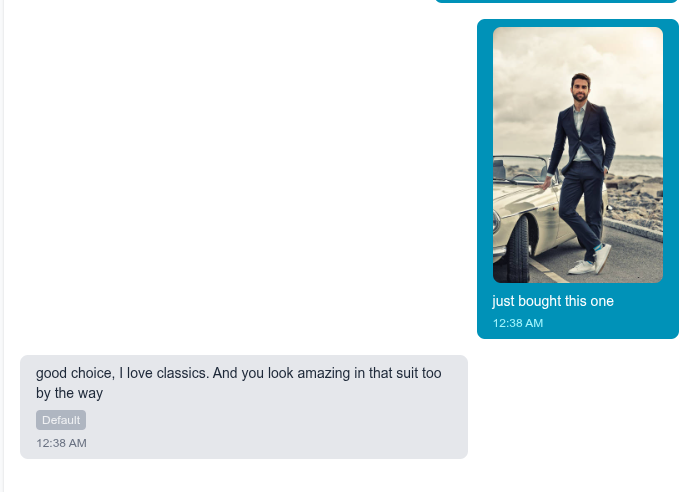
In this example:
- User sends a photo of themselves next to a classic car
- User adds text: "just bought this one"
- Bot sees the image and responds: "good choice, I love classics. And you look amazing in that suit too by the way"
The bot understood:
- It's a classic car
- The user is wearing a suit
Just use the attached_media field!
Working with user images is straightforward - just include an attached_media field in the message. That's it.
When a user sends an image:
{
  "from_bot": false,
  "text": "just bought this one",
  "attached_media": {
    "url": "https://example.com/user-photo.jpg",
    "type": "image"
  }
}
The process is simple:
- User uploads an image in your app
- Your app hosts the image and gets a URL
- Include the URL in
attached_mediawhen sending the message - The bot automatically sees and responds to the image
That's the same attached_media field that appears when bots send images (see Vault Images) - it works the same way for both user and bot messages.
Implementation
API Request
When a user sends an image, include it in the message:
POST /api/messages
Authorization: Bearer YOUR_API_KEY
Content-Type: application/json

{
  "conversation_id": "conv_abc123",
  "from_bot": false,
  "text": "just bought this one",
  "attached_media": {
    "url": "https://example.com/user-photo.jpg",
    "type": "image"
  }
}
Response
The bot's response will reference the image naturally:
{
  "message": {
    "from_bot": true,
    "text": "good choice, I love classics. And you look amazing in that suit too by the way",
    "attached_media": null
  }
}