Vault Images (Private Bot Content)
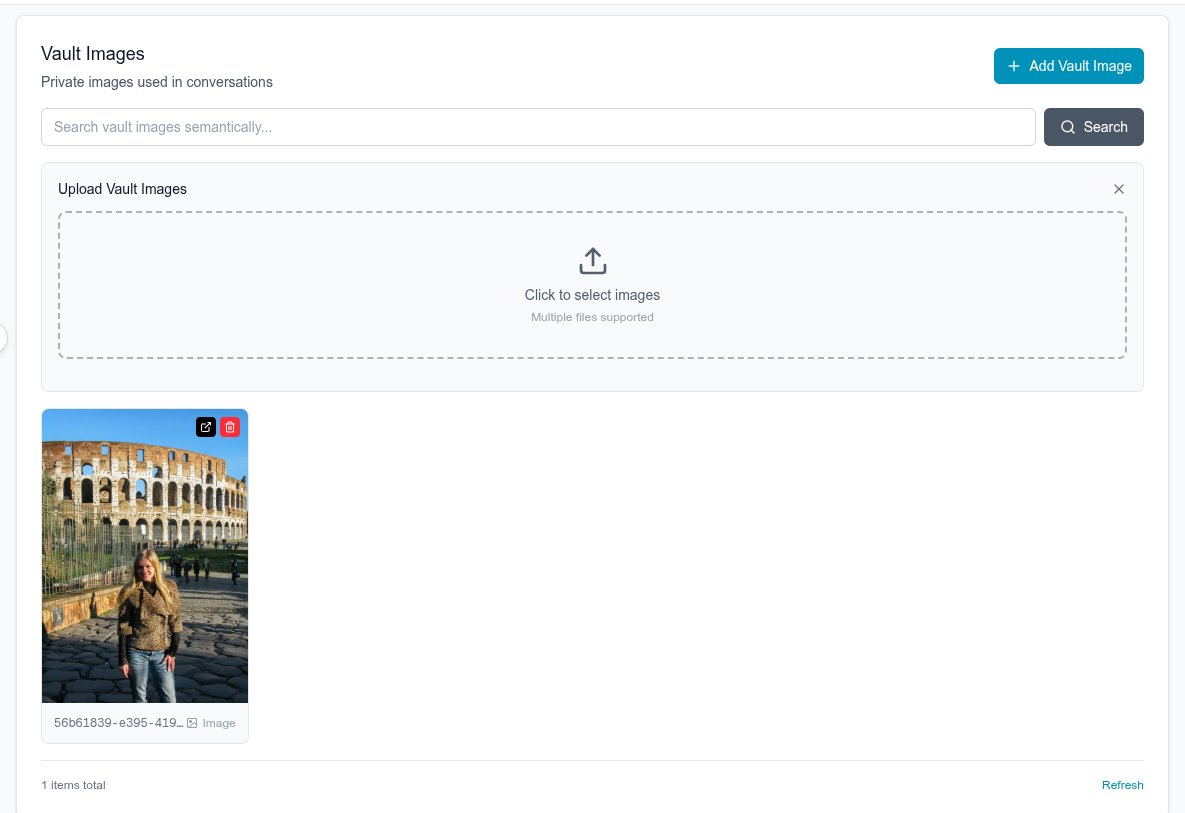
Vault images are a private library of photos that only the bot can access and share during conversations. Unlike public images that appear on profiles, vault images remain hidden until the bot decides to send them contextually.
Overview
- For Bots Only: Only bots can have vault images, users cannot (you can't upload images to a users "vault", obviously)
- Private: Not visible on the bot's profile - only sent in conversations
- AI-Selected: The bot intelligently chooses when to share these based on conversation context
- Realistic Sharing: Creates natural photo-sharing moments like real people have
Why Use Vault Images?
Vault images make conversations more realistic by allowing bots to share photos naturally during chat. The AI analyzes the conversation and decides when sharing a photo makes sense.
Managing Vault Images
Through the Dashboard
You can upload and manage vault images through the web dashboard at app.prioros.com.
Through the API
Upload a Vault Image
POST /api/content
Authorization: Bearer YOUR_API_KEY
Content-Type: application/json

{
  "bot_id": "550e8400-e29b-41d4-a716-446655440000",
  "image_url": "https://example.com/vault-photo.jpg",
  "public": false
}
Note: Setting "public": false makes this a vault image instead of a public profile image.
How It Works in Conversations
The bot analyzes the conversation context and decides when to share a vault image. This happens automatically based on what's being discussed.
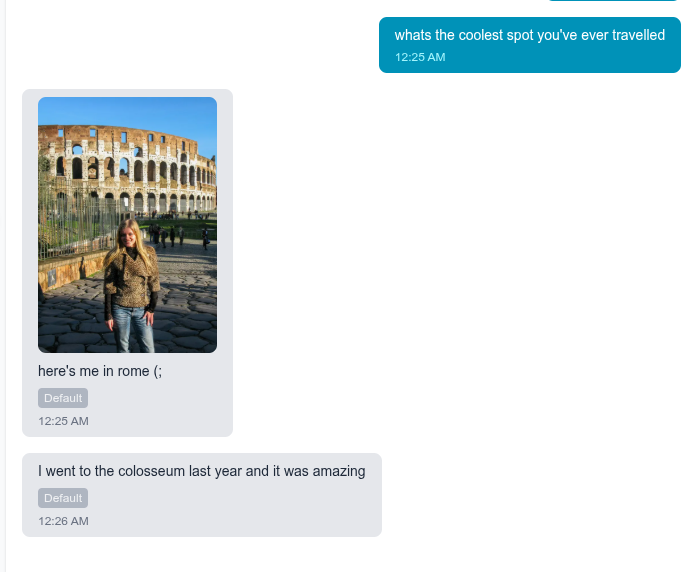
In this example:
- User asks: "whats the coolest spot you've ever travelled"
- Bot responds by sharing a photo from Rome (from their vault)
- Bot adds context: "here's me in rome (:"
- Continues naturally: "I went to the colosseum last year and it was amazing"
The bot knew to share this specific photo because it was relevant to the travel question.
Just use the attached_media field!
Working with vault images is straightforward - when the bot decides to send an image, it simply includes an attached_media field in the message. That's it.
When you receive bot messages:
{
  "from_bot": true,
  "text": "here's me in rome (:",
  "attached_media": {
    "url": "https://...",
    "type": "image"
  }
}
The bot automatically:
- Selects an appropriate image from its vault based on context
- Includes it in the
attached_mediafield - Adds appropriate text to accompany the image
You just need to:
- Make sure your images are uploaded
- Display the image from
attached_media.urlwhen present - Show the text alongside it
No special handling needed - the attached_media field works the same whether it's a vault image the bot is sending or an image the user sent (see User Sending Images).
How Bots Choose What to Send
The AI analyzes:
- Conversation topic: What's currently being discussed
- Context relevance: Which photos match the moment
- Natural timing: When sharing makes sense
- Bot personality: What this specific bot would likely share
The bot doesn't randomly send photos - it waits for natural moments where sharing an image makes the conversation better, just like a real person would.
API Reference
Upload Vault Image
POST /api/content
Authorization: Bearer YOUR_API_KEY
Content-Type: application/json

{
  "bot_id": "550e8400-e29b-41d4-a716-446655440000",
  "image_url": "https://example.com/photo.jpg",
  "public": false
}
List Vault Images
GET /api/content?bot_id=550e8400-e29b-41d4-a716-446655440000&public=false
Authorization: Bearer YOUR_API_KEY
Delete Vault Image
DELETE /api/content/{content_id}
Authorization: Bearer YOUR_API_KEY