Receiving Messages
The Chat API supports three patterns for receiving bot responses:
- Webhooks (Recommended) - Real-time notifications when messages arrive
- Polling - Check for new messages at regular intervals
- Generate Response - Get an immediate synchronous response
Set up real-time message delivery with webhooks
Polling GuideCheck for messages at regular intervals
Generate Response GuideGet synchronous responses for simple interactions
Integration Patterns
Webhooks & Polling (Asynchronous)
Both webhooks and polling provide the same core capabilities - the only difference is how you receive notifications.
Shared Benefits:
- Natural conversation flow with interruptions and multi-message responses
- Supports artificial delays of any length (1 hour, specific hours of day, etc.)
- Messages can be answered later if systems are unavailable
- Supports unprompted messages (automatic follow-ups, re-engagement)
Examples: Configure bots to only reply between 9 AM - 11 PM for realism, add a 30-minute delay, or send a follow-up message 24 hours later if the user hasn't responded.
Webhooks (Recommended): Real-time push notifications to your server. Requires a publicly accessible endpoint.
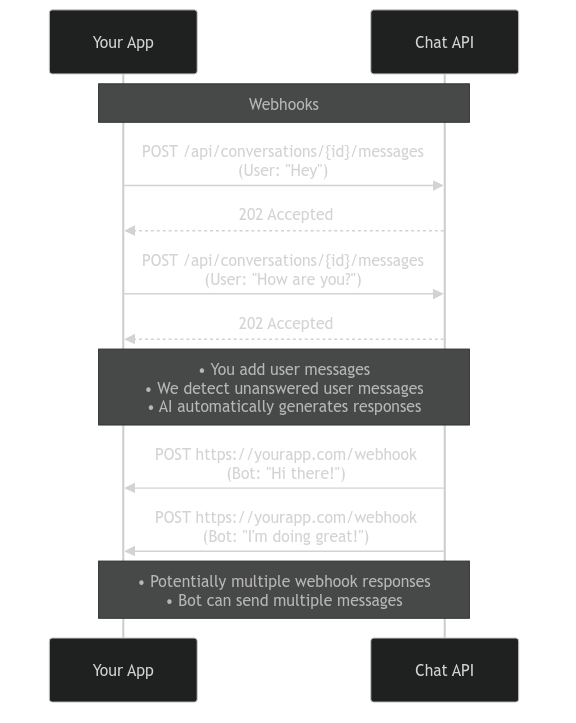
This video demonstrates webhooks in action. It first shows the request for creating a bot, then creating a conversation. The user then sends multiple messages and receives multiple bot responses in real-time, without turn-taking or waiting. The right side shows the terminal output with outbound requests (messages sent to the API) and inbound requests (webhooks received from the API). The left side displays the conversation history—equivalent to calling GET /conversations/{id}/messages—showing what your end user would see.
Set up real-time message delivery with webhooks
Polling: Fetch the conversation's message history at regular intervals (e.g., every 500ms) to check for new messages. No public endpoint needed, works in any environment.
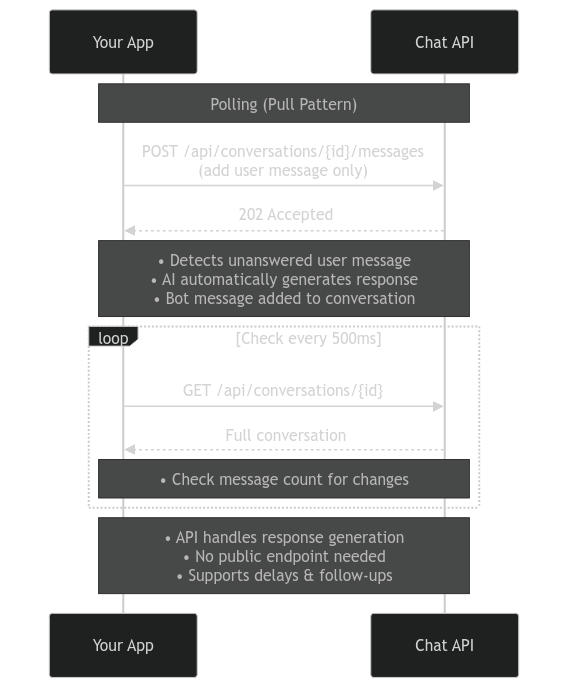
Check for messages at regular intervals
Generate Response (Synchronous)
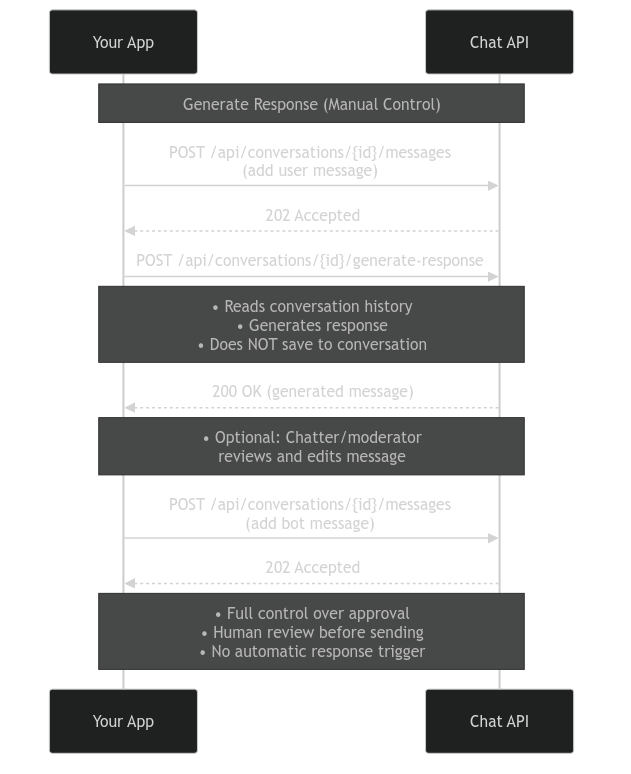
Call /generate-response to get an immediate bot reply. The bot generates and returns a response synchronously.
Benefits:
- Simplest approach (one API call)
- More control over scheduling responses yourself
- Synchronous request/response
Limitations:
- One message in, one message out only - No conversation stream
- No interruptions - User can't send a new message while bot is "typing"
- No multi-message responses - Bot can't send multiple messages in sequence (segmentation disabled)
- No unprompted messages - Bot can only respond to user messages, cannot send automatic follow-ups or re-engagement messages
What this means in practice:
In a normal conversation, a user might send:
User: "Hey how are you?"
User: "What are you up to tonight?"
Bot: "I'm good!"
Bot: "Just finished my workout"
Bot: "Probably gonna watch a movie later"
With /generate-response, this flow isn't possible. Each call is isolated:
Call 1: User sends "Hey how are you?" → Bot responds "I'm good! Just finished my workout, probably gonna watch a movie later" (one combined message)
Call 2: User sends "What are you up to tonight?" → Bot responds based on this message only
Recommended for:
- Ease of implementation
- Conversations that are strictly 1:1 (one user message → one bot message)
- Token-based pricing sites where you charge per message, as user and bot messages are taken in turns, because sending additional messages is expensive
- If you would like to have your chatters/moderators review or edit AI messages before sending them to the user
Get synchronous responses for simple interactions
Which Should You Use?
All three patterns are production-ready and valid depending on your use case.
Use Webhooks if: You want real-time delivery and have a server that can receive HTTP requests.
Use Polling if: You can't expose a public endpoint, or prefer a simpler setup without webhooks.
Use Generate Response if: You need simple request/response flow and don't require users to send multiple messages in sequence.